
Open OnDemand puts the clusters in your web browser: a terminal, a file manager, job tools, and dozens of point-and-click apps like Jupyter, RStudio, MATLAB, VS Code, and full Linux desktops. There's nothing to install, and it works on any computer.
On this page: Portals · Log in · A quick tour · Apps · Launching an app · Files · Good habits · Troubleshooting
Portals
Each cluster has its own portal and its own set of apps.
| Cluster | Open OnDemand address | Apps |
|---|---|---|
| SeaWulf | sn-ood.seawulf.stonybrook.edu | 18 apps on CPU nodes: notebooks, R, MATLAB, chemistry and structural biology |
| NVwulf | nvwulf-ood.nvwulf.stonybrook.edu | 19 apps on GPU nodes: notebooks, AI chat, cryo-EM, imaging |
| ClinWulf | clinwulf-ood.uhmc.sbuh.stonybrook.edu | 8 apps for research with PHI |
Log in
- Open the portal for your cluster.
- Sign in with your NetID and NetID password.
- Approve the Duo request (see Duo authentication).
You'll need an account on that cluster first. See Requesting accounts & project numbers and, for GPUs, Getting access to NVwulf.
A quick tour
The menu bar at the top of every portal has the same parts:
| Menu | What's there |
|---|---|
| Files | A file manager for your home folder (and, on SeaWulf, your scratch folder). Upload, download, edit, rename, and move files. |
| Jobs | Active Jobs lists your running and waiting jobs. Job Composer builds and submits batch jobs from templates (see Job Composer). |
| Clusters | The Cluster Shell Access terminal, just like an SSH login, and on NVwulf and ClinWulf a System Status page showing how busy the nodes are. |
| Interactive Apps | Every app you can launch, grouped by type (Servers, Desktops, GUIs, and so on). |
| My Interactive Sessions | Cards for the apps you've launched, with their status, time left, and connect button. |
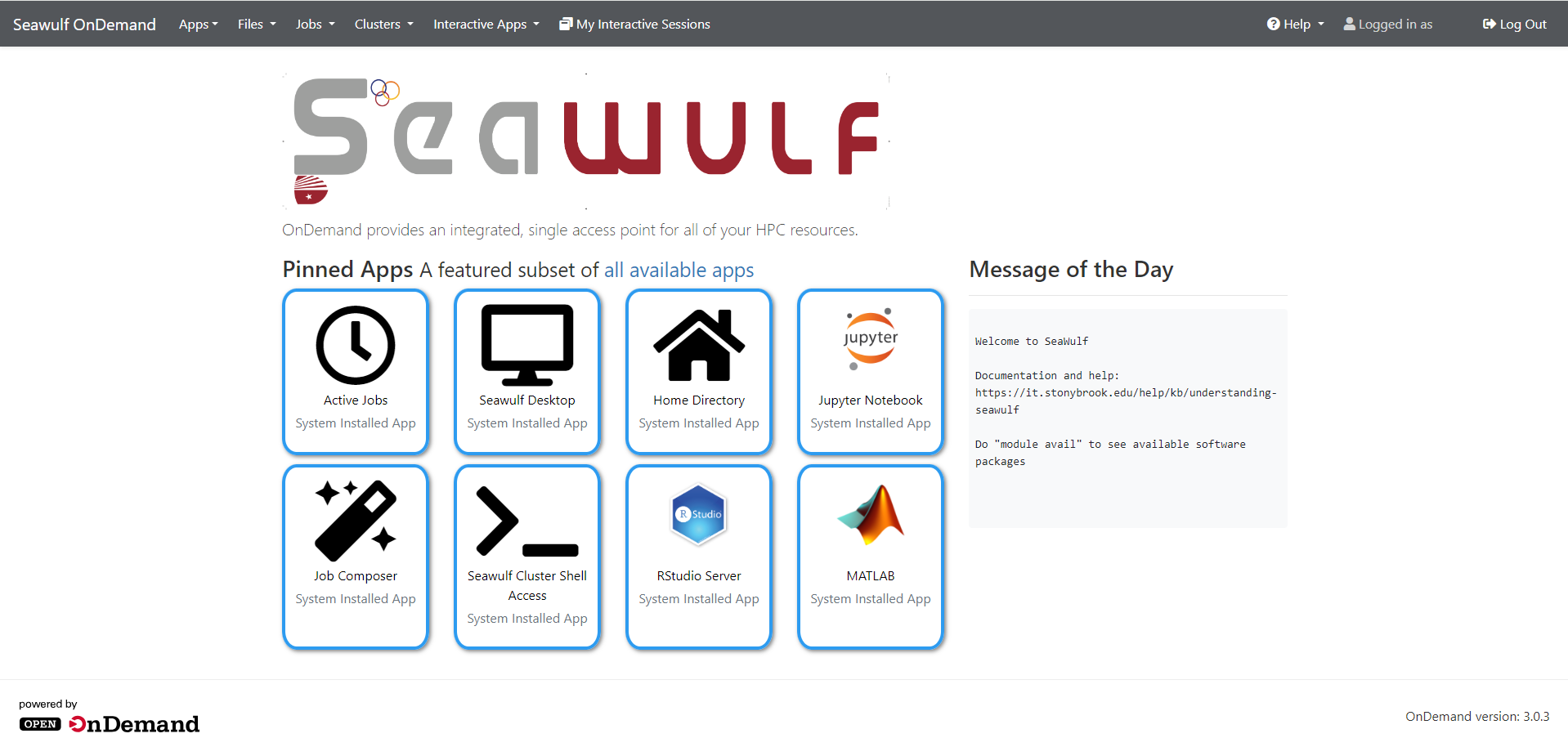
Apps
These guides cover the apps most people start with. Each one explains the launch form on every cluster that has the app.
| App | What it's for |
|---|---|
| Jupyter | Python notebooks, with your own conda environments |
| RStudio Server | R in the browser |
| MATLAB | MATLAB's full desktop |
| Code Server | VS Code in the browser |
| WolfieHPCDesktop | A full desktop for any graphical program |
| Job Composer | Create and submit batch jobs from templates |
For every other app, from Gaussian and ChimeraX to CryoSPARC and private AI chat, see the app pages for SeaWulf, NVwulf, and ClinWulf.
Launching an app
- Pick the app from Interactive Apps or the dashboard.
- Fill in the form: queue, hours, cores, memory, and on NVwulf and ClinWulf, GPUs. Ask only for what you need; smaller requests start sooner. The queue selection guide explains SeaWulf's queues.
- Click Launch. The session card moves from Queued to Starting to Running. Tick the email box on the form if you'd like a message when it starts.
- When it's running, click the connect button to open the app in a new tab.
- When you're finished, click Delete on the session card so the resources go back to others. Closing the browser tab doesn't end the session.
Working with files
Choose Files in the menu to browse, upload, download, create, rename, move, copy, and delete files, or to edit a text file in the browser.
| Cluster | Your home folder | Also in the Files menu |
|---|---|---|
| SeaWulf | /gpfs/home/<netid> | Your scratch folder, /gpfs/scratch/<netid> |
| NVwulf | /lustre/nvwulf/home/<netid> | Home only |
| ClinWulf | /vast/home/<netid> | Home only |
To reach other folders, such as your group's project space, add a shortcut (a symbolic link) in your home folder once, from a terminal. For example, on SeaWulf:
ln -s /gpfs/projects/<group> ~/project
Browser uploads and downloads are fine for small files. For large transfers, rsync or Globus are faster and more reliable.
Good habits
- Delete sessions you've finished with. An idle Jupyter or desktop session still holds its cores, memory, and GPUs until its time runs out.
- Start small. One to four cores and a modest amount of memory are plenty for most interactive work. Run big computations as batch jobs instead.
- Save as you go, especially near the end of your hours.
- Keep PHI on ClinWulf. SeaWulf and NVwulf aren't for patient data.
Troubleshooting
My session stays "Queued"
The queue you picked is busy. Delete the session and try a shorter or shared queue, fewer cores or GPUs, less memory, or fewer hours. On NVwulf and ClinWulf, Clusters then System Status shows how busy the nodes are.
The session card says "Completed" right after it started
The app didn't start properly, often because the home folder is full or the settings didn't fit the queue. Open the session's log with the link on the card (usually output.log) for the error, and check your space with myquota on SeaWulf.
The app opens but is blank or disconnects
Refresh the page or reconnect from the session card. If the session has ended, check its time limit and launch a new one.
The portal itself is acting strangely
Use Restart Web Server in the Help menu (top right). It restarts your personal portal process without touching your running jobs.
I can't sign in
Check your NetID password and Duo. Too many failed attempts can lock Duo. See Duo troubleshooting.
The Files app can't see my project folder
Add the symbolic link shown above, then refresh the Files page.
Still stuck? Open a ticket with the cluster, the app, and the time it happened, or drop into HPC virtual office hours.